
Cellular Network Explained: What It Is and How It Works
Most of us never think about the cellular network until our phone suddenly says “cellular network is not available”. One second you are scrolling or trying to call someone, and the next your phone refuses to cooperate. It feels like everything stops.
Let’s talk about what a cellular network actually is, how it works, why it sometimes disappears, and what you can do about it. Simple explanations. No complicated tech talk.
Why Cellular Networks Matter
Your mobile signal controls more of your day than you realise. Maps, calls, texts, apps, internet, even ordering a cab all need it.
A friend of mine was once doing a phone interview while travelling by train. Everything was fine until the train entered a weak-signal area and his phone dropped the call. His screen popped up “cellular network is not available”. He just stared at it in disbelief.
That tiny signal icon can make or break your day.
What Is a Cellular Network
Here’s the simplest way to understand it.
A cellular network is a giant system of towers that cover different areas called cells.
Your phone connects to one of these towers to make calls, send texts or use mobile data.
Think of the country as a huge grid. Each grid box has a tower.
When you are inside that box, your phone uses that tower to stay connected.
Move out of that box?
Your phone switches to the next tower without you noticing.
That’s all a cellular network is: towers, signals and your phone talking to them.
How Does a Cellular Network Work
Here is the process in normal language:
The tower checks if your SIM is valid and you have an active plan. Your phone has a SIM card that tells the network who you are. Your phone looks for the nearest tower. If everything is fine, the tower lets you connect. When you move around, your phone quietly switches to the next tower so your call or data stays active.
That’s it. Nothing magical. Just your phone jumping from tower to tower as you move. And with Talk Home Mobile, you can take advantage of affordable SIM only deals that give you reliable coverage, flexible plans, and great value without being locked into a long-term contract.
Types of Cellular Networks (2G to 5G)
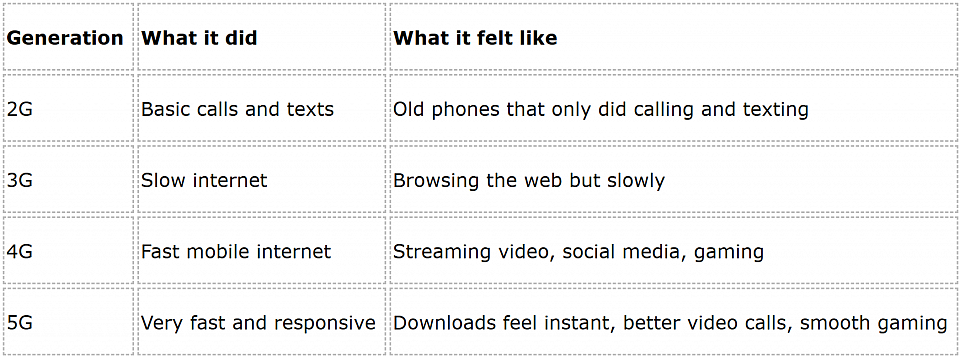
You are likely using 4G or 5G today.
What We Use Cellular Networks For
You use the cellular network every day without thinking about it.
- Messaging when not on Wi-Fi
- Calling friends or family
- Using Google Maps
- Streaming music on the go
- Scrolling Instagram or TikTok outside
- Hotspotting your laptop
- Making cheap international calls with apps like Talk Home App
A student once told me he does all his uni work on his phone’s data because the campus Wi-Fi never works. For him, mobile data is life support.
Why “Cellular Network Is Not Available” Appears
This message is annoying, but the reasons are usually simple.
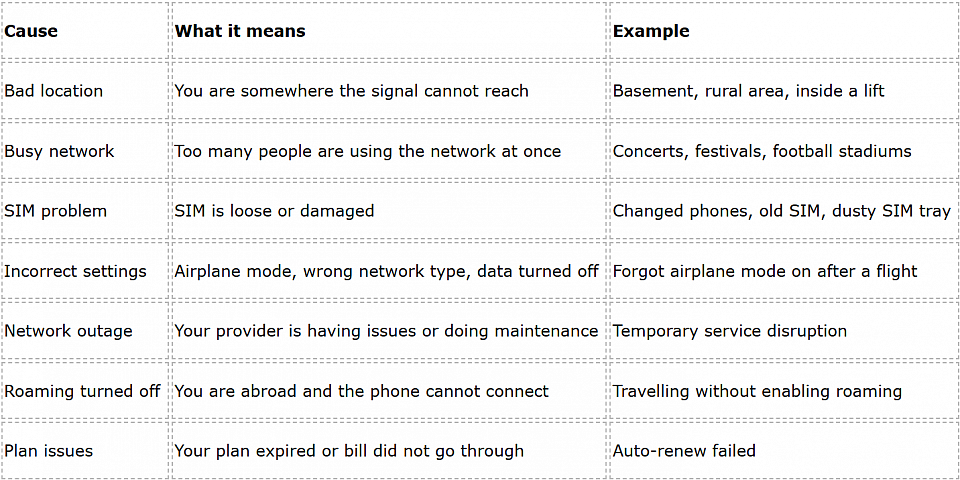
A friend once spent half a day thinking his phone was broken. Turns out his plan had expired two days earlier. As soon as he topped up, the network came back.
Read More: Cellular Network Not Available for Voice Calls: Reasons & Solutions Identified
Cellular Network vs Wi-Fi: Simple Comparison
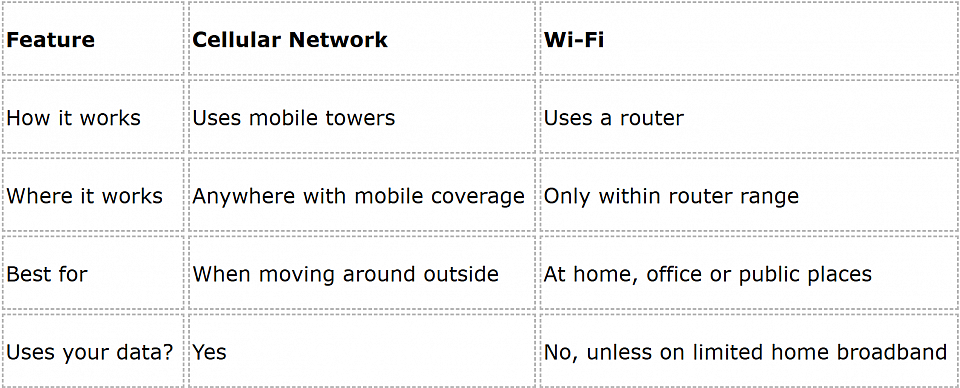
Basically:
Wi-Fi is for staying in one place.
Cellular networks are for moving around anywhere.
How to Improve Your Cellular Signal
Here are simple things that usually help:
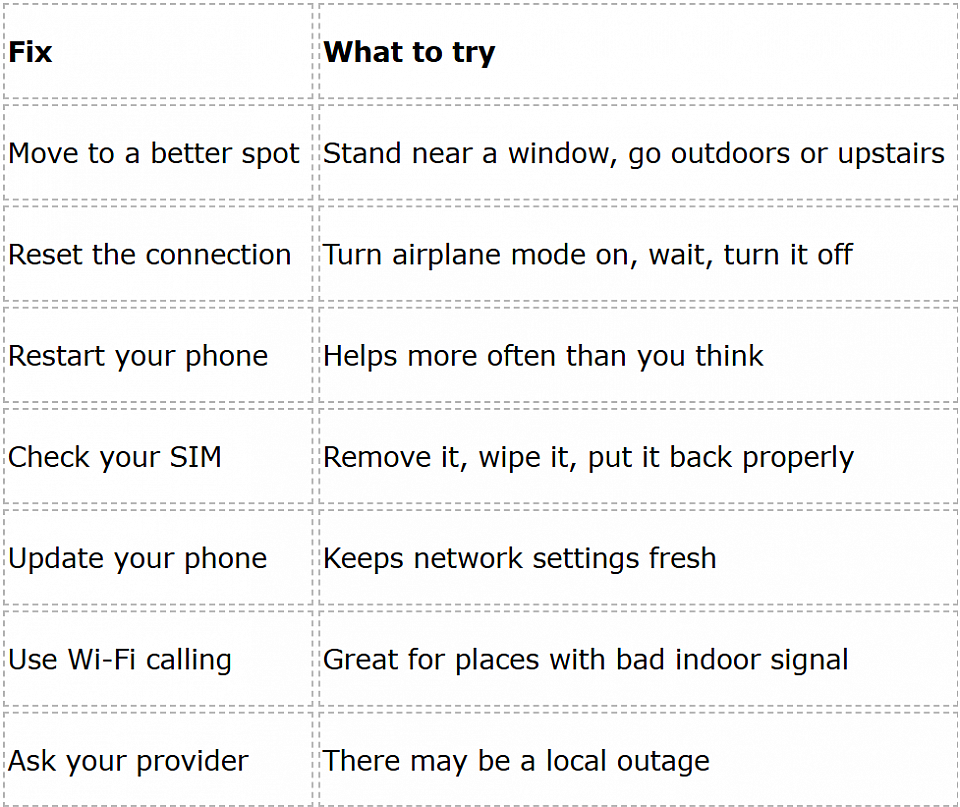
I know someone whose house had terrible indoor signal. They turned on Wi-Fi calling and suddenly all their calls were clear. Easy fix.
Future of Cellular Networks
Right now most of us use 4G and 5G.
In the future we will see:
- Faster speeds
- Better video quality
- More stable connections
- Support for more smart devices
- Less delay when gaming or video calling
Basically, everything will get smoother and quicker.
Conclusion
A cellular network is just the system of towers and signals that keeps your phone working when you are not on Wi-Fi. It is what lets you call, text and use the internet while moving around.
When your phone says “cellular network is not available”, it is usually something simple like signal, settings or your plan. Most of the time, you can fix it with a quick check.
And if your network constantly fails you, drops calls or always shows low signal, it might just be the provider. Sometimes switching to a better plan or network makes all the difference.
